


Managing money on your phone is not a dream — it is a reality you can embrace today. There are many great apps in both Google’s Play Store and Apple’s App Store, and here we want to highlight those that we think are the best.
Some of these apps bring tools only big boys like hedge funds are using to regular folks like you and me. Also, some are offering free cash just to get started, which typically comes as an added bonus to the already amazing proposition.
So without further ado, here are the best apps to help you save, invest and manage your money on your smartphone (or tablet)…
1. Aspiration Summit Checking


With that in mind, it is not a surprise that many people are choosing Aspiration for their second account, with some millennials even going with Aspiration alone.
Aspiration’s MasterCard debit card coupled with the Aspiration Summit Checking mobile app makes for a powerful combo to manage your finances while on the go.
Finally — and this is where it gets really interesting — Aspiration is not yet another bank; rather it is a California startup that actually puts its clients first. And donates 10% of revenues to charity.
We love it and we’re sure you’ll love it too. Click here to open the Aspiration checking account.
2. Stash
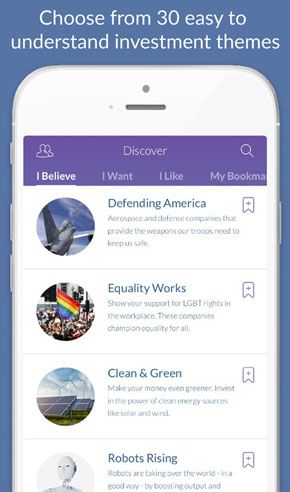
In other words, it’s like an Index fund on steroids, but instead of sticking to a certain market indicator like Dow Jones or S&P 500, Stash goes for a theme-based approach, offering such ETFs (Exchange Traded Funds) as Clean & Green, American Innovators, Global Citizen (includes 7,000 companies across 40 countries), Delicious Dividends (100+ companies with a history of paying dividends), Blue Chips, and more. You can invest as little as $5 per week, and see your fortunes rise over time.
The service is accessible both from the web and a mobile app, the latter of which is available on iOS and Android devices. Said app also includes curated educational content to help you develop smart financial habits.
Stash is free for the first 3 months, after which it charges a $1 flat monthly fee. It doesn’t charge deposit, withdrawal or trading fees. When your account reaches $5,000, it charges an annual flat fee of 0.25% per year (so it’s $12.50 a year for an account with $5,000).
Again – you get $5 just to try Stash out!
3. Clink

Instead of putting money in a bank savings account where it would barely collect interest, we opt to put it to a better use with a service like Clink that lets us see how our fortunes rise on a smartphone.
When you register for Clink you are basically filling out all the required information needed to open an investment account. Then you can choose your method of savings. You can either link your credit card and set a fixed percentage of your expense for Clink to allocate to your savings or you can put yourself on a schedule and set a fixed amount to be transferred to your Clink account starting from as little as $1 a day. Then all that is left is to choose which Exchange Traded Funds (ETF) portfolio, managed by Vanguard, you want to invest in and you are all set.
Your money is SIPC insured up to $500,000 so you are always protected and can withdraw money at any time. Check it out, and get a $5 sign-up bonus to get started!
4. Credit Sesame
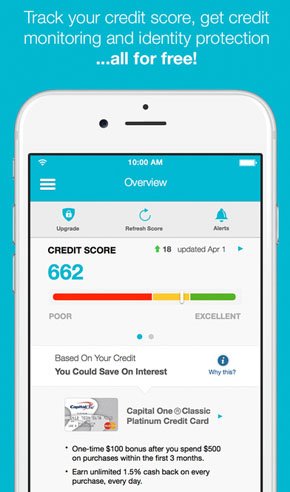
Beyond that, Credit Sesame features the Home Buying Power tool to tell you how much home you can actually afford, as well as personalized recommendations for the best credit cards, mortgage rates and refinance options.
As they like to put it, Credit Sesame offers a “complete picture of your credit and loans in one place” to help you “find the best way to manage your credit and loans, while you save money and build wealth.”
The free to download app has been used by more than 6 million people; you can get it from here.
5. Acorns

The service lets you choose between more than 7,000 ETFs that span both stocks and bonds. The built-in flexibility allows you to make recurring investments (daily/weekly/monthly), one-time investments, referrals, and “found money.” From the mobile app, you can watch your progress, and learn new stuff related to investments and finance.
Your investment with Acorns is SIPC protected up to $500,000, and you can withdraw money at any time at no charge.
Acorns costs $1 per month for accounts investing less than $5,000. After your account grows past $5,000, the fee switches to 0.25% per year… Click here to get started with Acorns.
6. Digit
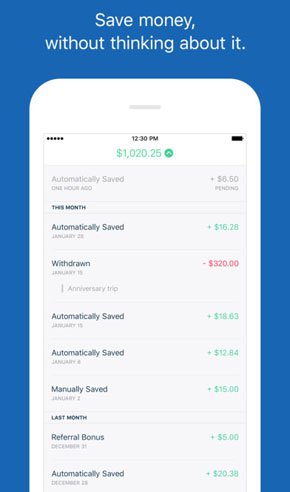
In order to get started, you should connect your checking account to Digit which will then analyze your income and spending, and find small amounts of money it can safely set aside for you.
From there, Digit will transfer small amounts of money (typically between $2-$17) to your Digit savings. It will never transfer more than you can afford, so you don’t have to worry about over-drafting your account. In fact, it offers a no-overdraft guarantee.
And if for some reason you need the money deposited in Digit, you can withdraw it at any time. The service allows unlimited transfers with no minimums and no fees.
Digit is now saving over $100 million per year for its members. Check it out.
7. Squeeze
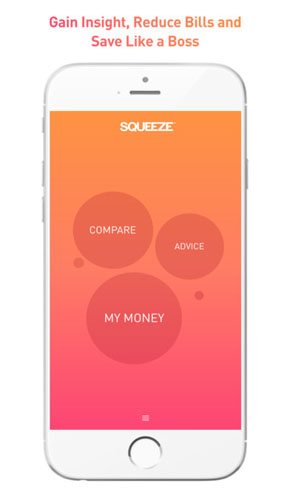
The app is designed to raise awareness of consumers’ personal financials through analytics and coaching, and to (obviously) help them save money on their recurring bills through its price aggregating feature.
Squeeze supports unlimited accounts, and you will be offered personalized advice on every account added to the app.
As part of the setup process, you will connect all of the accounts you want to monitor and then download the Squeeze app to your iPhone or Android smartphone. It’s actually pretty easy, so do try it out.
8. Mint

In addition to the mobile app, Mint is also available on the web via Mint.com, allowing you to manage your finances both on the go and from a comfort of a real PC/Mac. Naturally, the web-based and mobile apps work in sync to keep all your bank accounts, credit cards, budgeting, spending and everything else up to data. If needed, you can export spreadsheets…
Click here to get started with Mint.